Reports.Data-first reporting: built for engineers, agents, and leaders.
Replace noisy, screenshot-heavy dashboards with actionable diagnostic data. Every Benchmarq audit delivers complete test output as machine-readable JSON, page-by-page and domain-wide issue lists, and shareable interactive HTML reports for your stakeholders.
Synopsis
- Composite score
- One unified 0–100 AI readiness score derived from weighted mathematical models across all four tracks.
- Track breakdowns
- Dedicated score metrics for GEO, AIO, AEO, and CORE to pinpoint exactly which technical areas drag down visibility.
- Granular issue lists
- Categorized into page-specific flaws and domain-wide rules, complete with severity ratings and exact remediation guidance.
- Test-level data
- Detailed pass/fail outcomes for all 200+ checks. View our complete checks reference catalog.
- Deliverable formats
- Complete structured JSON exports, self-contained interactive HTML pages, and optional PDF summaries and embeddable badges.
- Direct assistant access
- AI coding assistants connected via Benchmarq MCP can query report data directly via API.
- Add-on results
- Specialist evaluations for Agentic App workflows and Agentic Commerce checkouts are included and reported in dedicated sections.
- Privacy & security
- Audit results are stored securely in your private account and are only shared when you choose to export or distribute the report.
Built for automated pipelines and human decision-making
Traditional dashboards lock insights inside proprietary charts. Benchmarq gives you pure, structured diagnostic data that flows seamlessly into your existing tools.
For developer tools & automation
Full JSON schemas containing raw scores, track evaluations, and test outputs. Pipe results into Jira tickets, CI/CD regression gates, or internal monitoring systems.
For cross-functional teams
Clean, interactive HTML reports featuring visual score breakdowns and prioritized action items designed for clear reading by marketing, product, and agency leads.
For AI assistants & agents
Query complete report payloads directly through Benchmarq MCP. Let your coding assistant inspect failed checks and suggest fixes while you code.
Explore Benchmarq MCP→


Granular page-level diagnostics and global site rules
Separate localized template errors from domain-wide infrastructure blockers so you can assign fixes to the right teams immediately.
Page-level issue breakdowns
Pinpoint specific URL defects—such as malformed structured data, missing canonical tags, or poor heading hierarchies. Hand them straight to content and template authors.
Site-level infrastructure issues
Surface domain-wide blockers like crawler user-agent restrictions, missing llms.txt discovery files, or server response bottlenecks. Fix them once in your infrastructure to benefit every page.
Single-page scans evaluate individual URLs; full domain scans crawl your entire sitemap. Learn more in the web workspace overview.
How different roles use the report
One standardized benchmark providing tailored clarity across the organization.
Marketing and growth leads
Use composite scores and track breakdowns to communicate AI search readiness to leadership and verify improvements after campaigns.
Engineering and web teams
Consume JSON exports and exact check outputs with code-level remediation steps ready for sprint planning and implementation.
Digital and technology leaders
Align marketing and engineering around an objective 0–100 technical standard and govern compliance across brand portfolios.
Agencies and consultants
Deliver client audit deliverables in minutes with standalone HTML reports, comparative benchmarks, and automated API exports.
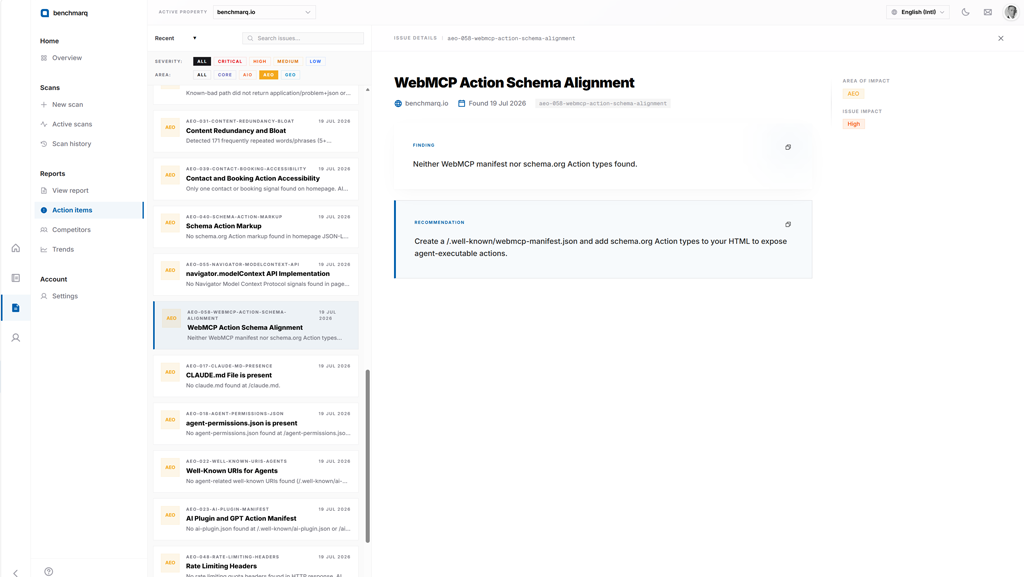
Prioritized remediation ranked by score impact
Every check deduction is converted into an actionable fix item ranked so your team solves the biggest blockers first.
Included in every report
- Test-by-test failure root causes ordered by potential score gain
- Severity classifications and code-level remediation advice
- Composite 0–100 score with GEO, AIO, AEO, and CORE breakdowns
Enhanced on paid plans
- Interactive action item filters by track, severity, and status
- Historical score tracking across deployments to verify fix impact
- Side-by-side competitor benchmarking and gap analysis
Compare plan allowances and feature tiers on the pricing page.
Additional formats for client presentations
Standardized exports for executive reviews, client handoffs, and public brand trust.
PDF export
Fixed-layout executive summaries suitable for formal client presentations and documentation archives.
Embeddable score badge
Showcase your verified AI readiness score directly on your website or in pitch decks.
Questions.
Direct answers about Benchmarq reports.
What do I receive after running a scan?
You get an overall AI readiness score from 0 to 100, a score for each of the four tracks, and a prioritized list of fixes. You generate the report in the app and download it as JSON or as a shareable HTML report. PDF and a badge are also available. See the reports.
Do I need an account to generate and download reports?
Yes. Audits are initiated from the web workspace or via Benchmarq MCP. Once an audit finishes, you can download the complete JSON payload or standalone HTML report and share them freely with team members or clients—no additional logins required for viewers.
What is the difference between page-level and site-level issues?
Page-level issues are specific to a single URL (e.g. invalid JSON-LD schema or missing heading hierarchy). Site-level issues apply across the entire domain (e.g. robots.txt crawler blocks, llms.txt configuration, or missing sitemaps). Every scan categorizes issues clearly so teams know what can be fixed globally versus per template.
Who can see my report?
Reports are private to your account unless you choose to share them.
Can I read reports through my AI assistant?
Yes. The Benchmarq MCP server lets an assistant read scores, issues and full scan reports. See Benchmarq MCP.
Do I need technical knowledge to use the results?
No. The report is designed for every team. Marketing and business leads get a clear score and prioritized actions. Engineers get the technical detail to act on them. You can even use it with your own AI via MCP.
Generate your first report now
Sign up in seconds, enter any public URL, and receive a comprehensive AI readiness report in under 2 minutes. Free plan includes 4 pages a month.