Domain tracking.Track score history and prevent AI visibility regressions.
Monitor score evolution across deployments, verify that schema and crawler updates delivered their intended gains, and catch unintended regressions before they damage your AI search presence. Maintain an audit baseline for every domain in your portfolio.
Synopsis
- Core function
- Centralized workspace to monitor domain health, inspect historical audit trends, and launch re-scans in one click.
- Domain capacity
- 1 tracked domain on Free, 3 on Standard, and 10 on Premium.
- Historical trends
- Visual time-series tracking of composite and per-track scores across all completed audits. Available on Premium.
- Usage tracking
- Real-time dashboard displays monthly page scan consumption and remaining plan allowances.
- Access channels
- Inspect visual graphs in the web workspace or query score trajectories via Benchmarq MCP.
Follow score evolution across continuous releases
The trend dashboard charts composite and track-level scores across audits. Use it to catch regressions the moment a deployment ships and to verify the ROI of remediation work.
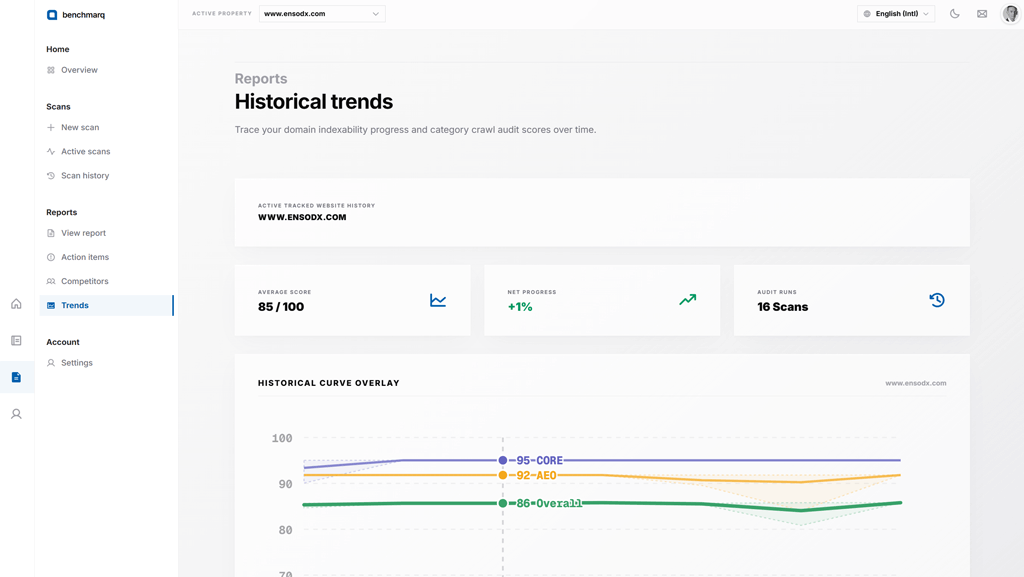
Catch deployment regressions
Re-scan after major frontend or infrastructure releases. A score drop in any track points immediately to the code change that caused it.
Verify remediation impact
Confirm that schema fixes, crawler directive adjustments, or content restructuring delivered expected score gains.
Report measurable progress
Provide leadership and clients with objective, data-backed proof of ongoing visibility improvements scan by scan.
Historical trend analytics are available on the Premium plan. View pricing details.
What does an empirical score history look like?
Here is the real audit history of the benchmarq.io home page. Real engineering projects experience fluctuations, and tracking makes those shifts transparent.
| Audit Date | Composite Score (0–100) | Readiness Grade |
|---|---|---|
| 19 July 2026 | 70.65 | C |
| 26 August 2026 | 72.38 | C |
| 8 September 2026 | 90.03 | A |
| 28 September 2026, morning | 89.41 | B |
| 28 September 2026, evening | 92.57 | A |
Source: Benchmarq scan history for benchmarq.io (home page audits). Note that periodic scoring rule adjustments also contribute to score movements over time.
Multi-domain portfolio management
Organize all your production websites, staging environments, and regional subdomains in one central hub.
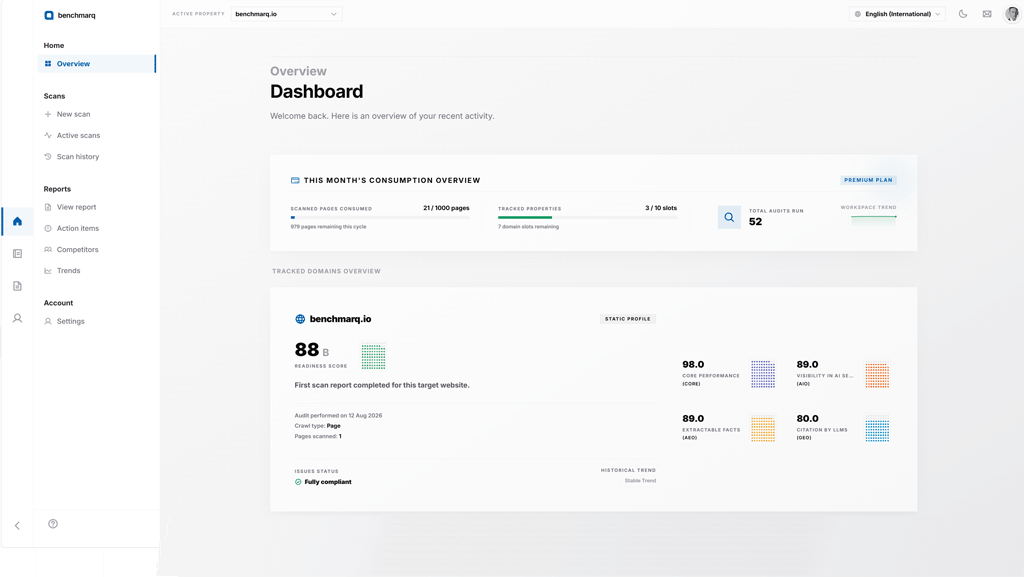
Want to benchmark your domains against industry rivals? Explore competitor benchmarking.
Questions.
Direct answers about domain tracking.
How do I start tracking a domain?
Run a scan for the domain in the web app. Tracked domains appear on your dashboard. How to start a scan.
How often should I scan?
Scan after every change that could affect crawling, markup or content, and at least whenever you want a fresh score to report on.
Are old scans kept?
Scores from every scan are kept as history for the domain, and any past scan can be opened again by its report.
Can my AI assistant read the history?
Yes. The MCP server has the score history of a page and of a whole domain. See Benchmarq MCP.
Track your first domain today
Register free and launch your baseline audit now. Every future fix is measured against this initial benchmark. Free plan tracks 1 domain.